StrategyQuant X · MetaTrader 5

Research tooling that trades what it tested.

Seven modules for systematic traders: Wyckoff market structure, neural-network training, edge measurement, alternative data, MT5 calendar blocks, databank housekeeping and data-gap repair. Each one is built so the number a backtest used is the number the live terminal reads.

  • SQX plugins + blocks
  • MT5 .mq5 companions
  • Offline licence check
  • Windows installer
Wyckoff accumulation schematic Price falls to a selling climax, rallies, tests, shakes out below support with a spring, then breaks above the creek with a sign of strength and holds at a last point of support. Volume bars sit beneath, phases A to E beneath those. CREEK ICE PS SC AR ST Spring SOS LPS VOLUME A B C D E
Fig. 1 — Accumulation schematic. Conceptual drawing of the structure the Wyckoff indicators detect, not market data.
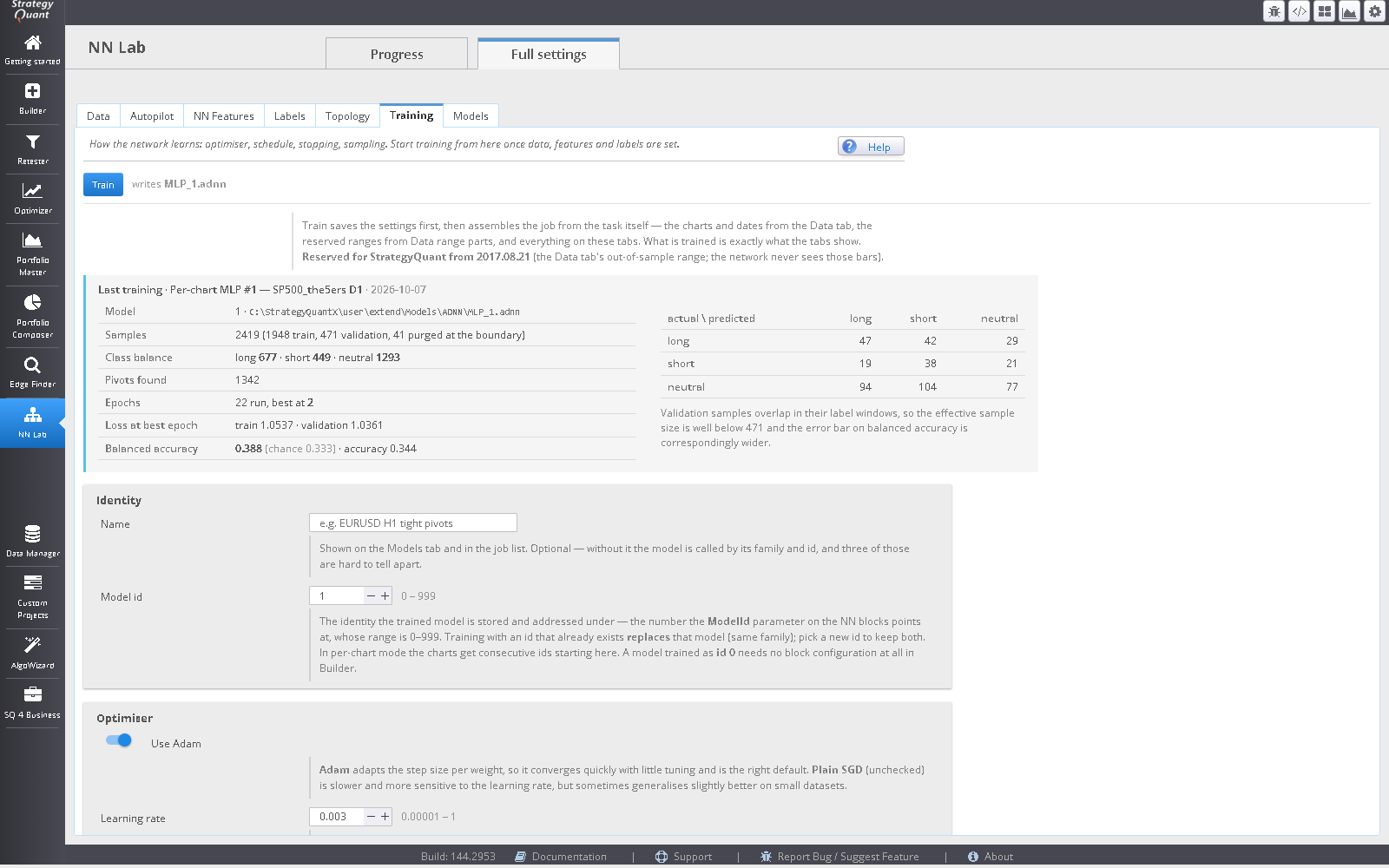
The AlphasWorth NN Lab inside StrategyQuant X, training a neural network with live progress and accuracy figures.
Screenshot coming: NN Lab inside StrategyQuant X
NN Lab, one of the AlphasWorth modules inside StrategyQuant X
How it is built

Three habits that run through every module

01

One artefact, two runtimes

The history a StrategyQuant backtest used is exported as files that MetaTrader reads byte for byte. Where the terminal extends data forward, it first re-derives recent rows and refuses to write if they disagree with StrategyQuant’s.

02

Publication time, not observation time

Alternative data carries the date each observation became publicly knowable. The CFTC Tuesday positioning figure is not visible on Wednesday’s bar. Shortening a stamp would turn the module into a leak generator, so the stamps are fixed.

03

Absent stays absent

A missing value is never quietly replaced by a constant that looks like a reading. Value, missing and unavailable are distinct states, and every condition block checks availability before it compares anything.

Products

Seven modules, sold separately or as one suite

Each page states what the module does, what it needs, and where its limits are.

Indicators

Wyckoff Indicators

An event-stream state machine that follows the published Wyckoff accumulation and distribution rules, with condition blocks for SQX and matching MT5 indicators.

Needs: SQX and/or MT5
Read more →
SQX app plugin

NN Lab

Train MLP, convolutional, LSTM and CONVLSTM networks in SQX. One model file drives SQX blocks and MT5, with the reserved out-of-sample tail never touched.

Needs: SQX; MT5 to deploy
Read more →
SQX app plugin

Edge Finder

Which side, which style and which blocks carry a measurable tendency on this symbol and timeframe, before you commit build compute.

Needs: SQX
Read more →
Data Manager tab

Alternative Data

Eighteen series that are not functions of the price chart: CFTC positioning, VIX complex, dollar index, EIA inventories and US macro.

Needs: SQX; free FRED and EIA keys; MT5 for the indicators and feed
Read more →
Data Manager tab

News

Extracts the calendar from your own MetaTrader 5 terminal (it supplies none), converts it to UTC against a measured server offset and publishes blackout and timing blocks. Schedule only, never outcome.

Needs: SQX for the tab and blocks; an MT5 terminal for the indicator and feed
Read more →
Databank action

NameSmith

Select strategies in a databank and name them Style_Ticker_TF_001, with a separate counter for each ticker and timeframe.

Needs: SQX
Read more →
Data Manager button

GapSmith

A Fix gaps button in Analyze data quality: fills short holes in M1 history and imports the result as a new symbol, leaving the original untouched.

Needs: SQX
Read more →
Bundle

Suite

Every module, one installer, one licence file. One-time price; the licence is lifetime and includes every future update.

Compare pricing
Where each piece sits

From a question about the market to a live terminal

Scroll the diagram sideways →

Module workflow Edge Finder measures bias, style and block edge and writes the answer into a Build task. Data and signal modules supply blocks. The StrategyQuant Builder produces strategies, which NameSmith names. MetaTrader 5 reads the same exported files. DECIDEEdge Finder market biasstyle fitblock edge SUPPLYInputs for the builder Wyckoff structureNN Lab modelsAlternative Data · News BUILDStrategyQuant X Builder + robustnesschecksNameSmith names results TRADEMetaTrader 5 same files, sameweights, samecalendar Edge Finder writes its answer back into the Build task; nothing is retyped by hand.
Fig. 2 — Module roles. You can use any one on its own.
For prop-firm traders

Drawdown limits make timing and honesty matter more

If a strategy has to survive a daily or trailing loss limit, two things in this suite are directly relevant: the News blocks, which can keep a strategy flat for a window around scheduled releases, and the verification built into the data modules, which exists so a deployed terminal does not drift from what was backtested.

This describes tooling, not an outcome. Nothing here promises that any strategy will pass an evaluation or stay inside a limit.
What we will not claim

  • No income, win-rate or drawdown figures. None are shown because none are offered.
  • No testimonials, user counts or logos.
  • No claim that any block, indicator or model has edge on your instrument. That is the question the builder and robustness checks exist to answer.
Risk disclaimer

Trading leveraged instruments carries a high risk of loss, including losing more than you deposit. Software here produces indicators, strategies and statistical reports; none of it is investment advice, and backtested or simulated performance does not indicate future results. You are solely responsible for validating anything you trade.

Start with one module or take the suite.